

Move your Vimeo library into your own pipeline

Vimeo is a good place to host and share video. But sooner or later many teams want their videos somewhere they control: their own player, their own CDN, an archive, or a pipeline that adds captions or thumbnails. Getting the files out means writing a Vimeo API client, paging through your library, waiting for videos that are still processing, and picking the right rendition of each one.
🤖 /vimeo/import handles the import, waits a limited time for processing to finish,
and selects the requested rendition before feeding the videos into the rest of your Assembly.
This example imports one page of up to 20 videos; page_number defaults to 1.
Step 1: give Transloadit read access to your videos
Vimeo only lets an app download your video files with a token that has the Video Files permission, and it hands that permission to other people’s apps only through its partner program. So you create the token yourself, in a Vimeo app of your own:
- At developer.vimeo.com/apps, create an app (or open one you have) and generate a personal access token with Public, Private and Video Files.
- In the Transloadit Console, open Credentials, add a Vimeo credential, choose Paste a
personal access token and name it, for example,
vimeo.
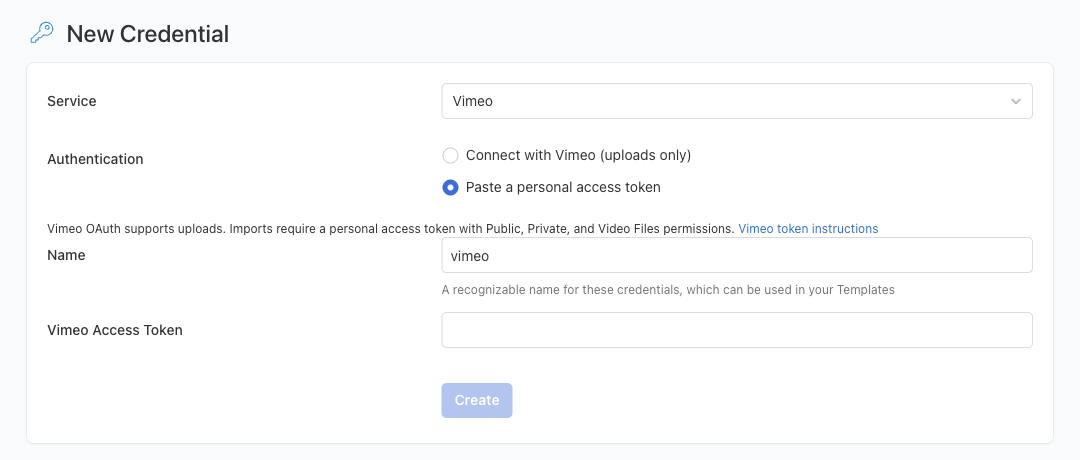
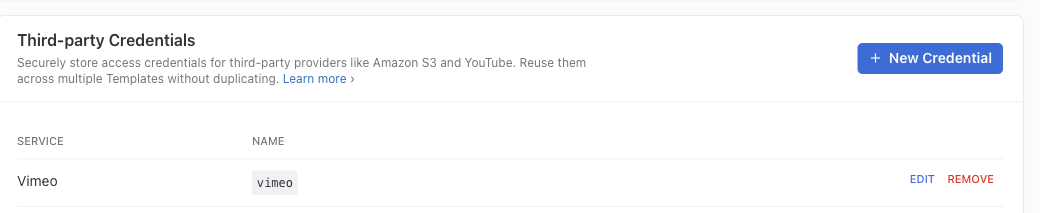
When you save, Transloadit checks the token with Vimeo and tells you if a permission is missing. The token is never shown again. Downloads still depend on your Vimeo plan and the video’s permissions. The Template Credentials docs have the details.
Step 2: one command
First, authenticate the Transloadit CLI. The SDK’s
browser login
uses npx -y @transloadit/node auth login to obtain a dedicated CLI key. This is separate from the
Vimeo Template Credential above.
Save these Assembly Instructions as vimeo.json:
{
  "steps": {
    "imported": {
      "robot": "/vimeo/import",
      "credentials": "vimeo",
      "path": "me/videos",
      "rendition": "720p",
      "files_per_page": 20
    },
    "encoded_480p": {
      "use": "imported",
      "robot": "/video/encode",
      "preset": "hls/480p",
      "ffmpeg_stack": "v7"
    },
    "encoded_720p": {
      "use": "imported",
      "robot": "/video/encode",
      "preset": "hls/720p",
      "ffmpeg_stack": "v7"
    },
    "hls": {
      "use": {
        "steps": ["encoded_480p", "encoded_720p"],
        "bundle_steps": true,
        "group_by_original": true
      },
      "robot": "/video/adaptive",
      "technique": "hls",
      "playlist_name": "playlist.m3u8"
    },
    "stored": {
      "use": "hls",
      "robot": "/transloadit/store",
      "path": "vimeo/${file.original_basename}/${file.meta.relative_path}/${file.name}",
      "conflict_strategy": "overwrite",
      "result": true
    }
  }
}
Then run it:
npx -y @transloadit/node assemblies create --steps vimeo.json -o out/
Each video on the selected page comes in at 720p, gets encoded at 480p and 720p, and is bundled
into its own adaptive HLS stream. group_by_original keeps each video’s renditions together, so you
get one playlist.m3u8 per video, named after its Vimeo ID:
$ find out/hls -name '*.m3u8'
out/hls/1243010274/playlist.m3u8
out/hls/1243010274/852x480_785191_25/852x480_785191_25.m3u8
out/hls/1243010274/1280x720_1367783_25/1280x720_1367783_25.m3u8
out/hls/1243010465/playlist.m3u8
out/hls/1243010465/852x480_769775_25/852x480_769775_25.m3u8
out/hls/1243010465/1280x720_1366589_25/1280x720_1366589_25.m3u8
The same tree lands privately in your Transloadit Storage under
vimeo/. Public playback needs separate delivery configuration; see our
hosting FAQ for an overview. The example intentionally uses
overwrite: rerunning reprocesses the current page selection and creates a new retained version at
each destination that already exists.
Prefer your own bucket? Swap the last Step for 🤖 /s3/store or any other
storage Robot with the same path.
Make it fit your library
- Albums, channels and more:
pathtakes Vimeo API paths that list videos, such asme/albums/:album_id/videos,me/channels/:channel_id/videosorme/likes. - Large libraries: Vimeo returns up to 100 videos per page. Set
files_per_pageand run once perpage_number. The Vimeo-to-Vimeo migration guide explains paging caveats and source-identity tracking. - Quality:
renditionaccepts240pup to1080p, orsourcefor the original upload. Originals are only available if Vimeo has retained them, and not every video has every rendition. When one is missing, the Assembly says so instead of failing silently. - Still processing: the wait is limited. If a video is still processing when the limit expires, the import fails and asks you to retry later. A failed Vimeo transcode fails the import immediately.
Get started
Create the token, add the credential, authenticate the CLI, and run the command above with your own account. The 🤖 /vimeo/import documentation lists every parameter.