
MCP Server
The Transloadit MCP Server lets agent clients call Transloadit tools directly: create and monitor Assemblies, lint Assembly Instructions, discover Robots and Templates, and show the results in the chat.
For a quick overview of what agents can do with Transloadit, see Transloadit over MCP.
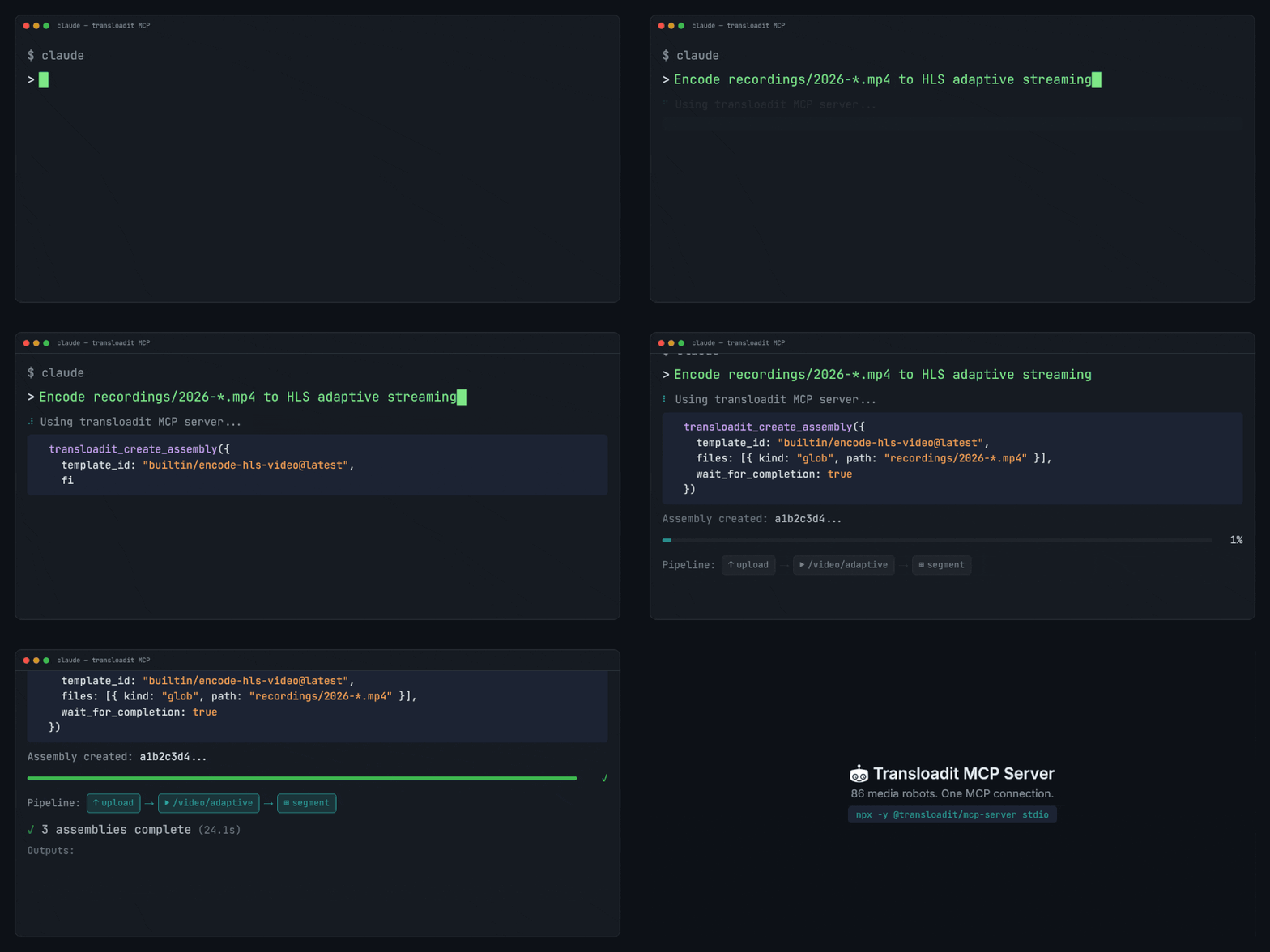
Choose how to connect
- Connect by URL (recommended): add
https://api2.transloadit.com/mcpto your agent client and approve access in your browser. There is nothing to install and no keys to copy. - CI and headless clients: where nobody can approve in a browser, send a Bearer token minted from an Auth Key.
- Self-hosted: run the server yourself with
TRANSLOADIT_KEYandTRANSLOADIT_SECRET, next to your agent.
Two ways to connect
Apps reach your Transloadit account in one of two ways. Both send a credential with each request, but they differ in who creates it, what it may do and how you take it back.
- OAuth (connect by URL): you paste
https://api2.transloadit.com/mcpinto the app and approve Transloadit’s consent screen for one Workspace. The app gets its own limited access (assemblies:read,assemblies:writeandtemplates:read) that renews by itself and that you can revoke on its own. There is nothing to copy, and the app is listed under Connected apps. Hosted chat apps such as ChatGPT and Claude need this, because they can’t send custom headers. - Auth Key or Bearer token: you copy an Auth Key, or a Bearer token minted from one, into the tool. It can do whatever the key allows until you delete the key, and it is not listed under Connected apps. This is the right choice for your own backend, scripts, CI, a self-hosted MCP server, and integrations such as Zapier.
| OAuth (connect by URL) | Auth Key or Bearer token | |
|---|---|---|
| What you do | Paste one URL and approve the consent screen | Copy a key or token into the tool |
| What the app gets | Its own renewing access to one Workspace: assemblies:read, assemblies:write, templates:read | Whatever the Auth Key allows |
| Where you see it | Connected apps | Auth Keys |
| How to revoke | Revoke the app under Connected apps | Delete the Auth Key |
When to use which
- Use OAuth when a person connects an agent client, such as ChatGPT, Claude, Codex, Cursor or VS Code. See Connect by URL.
- Use an Auth Key or Bearer token for code you run yourself and for tools that ask for a key. See CI and headless clients and Self-hosted.
Connect by URL
The hosted server lives at:
https://api2.transloadit.com/mcp
Add this URL to your MCP client. The client discovers the Transloadit API as its OAuth authorization server, opens a consent page in the Transloadit Console, and then keeps an access token plus a refresh token for you. Your Auth Secret never leaves your account.
The hosted endpoint asks you to sign in before any tool runs, Robot docs and linting included, because MCP clients only start OAuth when the endpoint asks them to. To use Robot docs and linting without an account, run the server yourself.
The consent page
When you connect, your browser opens the consent page. It names the app, shows where it sends you back to and lists the permissions it asks for. Pick the Workspace the app may use and approve.
Approving creates a dedicated Auth Key in that Workspace, limited to the permissions shown. Its
description is the app’s name followed by via OAuth and the date. An MCP connection gets at most
assemblies:write, assemblies:read and templates:read. The consent page shows how long each
access token lasts (a week for the MCP server); the app renews it on its own. To revoke access,
open Connected apps in the Console, which lists every app you approved with
its permissions and when it was last used. Revoking there ends the app’s access at once.
Claude Code
claude mcp add --transport http transloadit https://api2.transloadit.com/mcp
Then run /mcp in Claude Code, select transloadit and authenticate, or run
claude mcp login transloadit from your shell. Either way your browser opens the consent page.
For non-interactive runs, such as claude -p, allow the Transloadit tools explicitly:
claude -p "List my Templates" \
  --allowedTools 'mcp__transloadit__*' \
  --output-format json
Claude.ai and Claude Desktop
Go to Settings → Connectors →
Add custom connector and enter
https://api2.transloadit.com/mcp. Claude identifies itself to the Transloadit API and opens the
consent page. See
Claude’s custom connector documentation
for details.
ChatGPT
Go to Settings → Apps & Connectors → Advanced, turn on Developer mode and create an app with the URL above. Set its authentication to OAuth. ChatGPT passes files you attach in the chat to Transloadit for you, and shows results in the result widget.
ChatGPT keeps a snapshot of the tool list from when you created the app. After we add tools, open the app’s settings in ChatGPT and click Refresh tools to pick them up.
Codex
codex mcp add transloadit --url https://api2.transloadit.com/mcp
Codex opens the consent page right away. To sign in again later, run codex mcp login transloadit.
You can also add the server to ~/.codex/config.toml:
[mcp_servers.transloadit]
url = "https://api2.transloadit.com/mcp"
Cursor
Add the server to ~/.cursor/mcp.json:
{
  "mcpServers": {
    "transloadit": {
      "url": "https://api2.transloadit.com/mcp"
    }
  }
}
VS Code / Copilot
Add the server to your MCP configuration, for example .vscode/mcp.json:
{
  "servers": {
    "transloadit": {
      "type": "http",
      "url": "https://api2.transloadit.com/mcp"
    }
  }
}
Tool surface
| Tool | Needs an account | OAuth scopes | Notes |
|---|---|---|---|
transloadit_lint_assembly_instructions | No | None | Read-only |
transloadit_list_robots | No | None | Read-only |
transloadit_get_robot_help | No | None | Read-only |
transloadit_create_assembly | Yes | assemblies:write, templates:read | Destructive; result widget |
transloadit_get_assembly_status | Yes | assemblies:read | Read-only |
transloadit_wait_for_assembly | Yes | assemblies:read | Read-only; result widget |
transloadit_list_templates | Yes | templates:read | Read-only |
transloadit_get_profile | Yes | assemblies:read, templates:read | Read-only |
The hosted endpoint asks you to sign in before any tool runs; the tools marked “No” work without an account on a self-hosted server.
transloadit_create_assembly is the only tool marked as destructive: export Robots such as
/s3/store can overwrite files at their destination, so clients may ask you to confirm it.
transloadit_list_templates supports include_builtin (all, latest, exclusively-all,
exclusively-latest) and optional include_content. transloadit_get_profile returns the ID of
the Workspace behind the current credentials, plus its name when Transloadit can tell, and reports
mcp_profile_unavailable for a Workspace without Assemblies or Templates yet.
Input files
transloadit_create_assembly takes files in these ways:
- Public URLs (
fileswithkind: 'url'): the server imports or downloads them, see URL and template behavior. - Small inline files (
fileswithkind: 'base64'): practical only for small files, see Limits. - ChatGPT attachments (
attachments): ChatGPT passes files you attach in the chat automatically. Each one becomes a URL input namedattachment_1,attachment_2, and so on. - Files that only exist in the agent’s sandbox or on your machine: create the Assembly with
expected_uploadsand let the agent upload them, as described below.
Local file paths are not accepted as tool inputs, also not by a self-hosted server. To upload from
your own machine, you can also use npx -y @transloadit/node upload.
Files in an agent’s sandbox
Some clients, such as Claude.ai, do not hand chat attachments to connector tools, and base64 in tool arguments only works for tiny files. The agent then uploads the file from its own sandbox:
-
Call
transloadit_create_assemblywith your instructions andexpected_uploadsset to the number of files (at most 100 per call). The call returns right away, even withwait_for_completion: true, because the Assembly now waits for those uploads.{ "instructions": { "steps": { ":original": { "robot": "/upload/handle" }, "resized": { "robot": "/image/resize", "use": ":original", "width": 200 } } }, "expected_uploads": 1 } -
Each entry in
upload_instructionshas the tus endpoint, the tus metadata and a ready-to-runcurlcommand. The agent setsFILEto the file’s path and runs the command in a bash shell. It prints201once the file is uploaded. -
Call
transloadit_wait_for_assemblywith the Assembly URL.
The commands contain no credentials, but keep the Assembly URL private: whoever holds it can add files while the Assembly waits for uploads, read its status and results, and cancel it.
The sandbox needs outbound HTTPS access to Transloadit. On Claude.ai, open
Settings → Capabilities, turn on
network egress for code execution, and add *.transloadit.com to the additional allowed domains.
Add *.transloadit.net as well if the agent should download results back into its sandbox.
Result widget
transloadit_create_assembly and transloadit_wait_for_assembly link the MCP Apps resource
ui://transloadit/assembly-result. Clients that support MCP Apps, such as ChatGPT and Claude, show
the Assembly as a card in the chat. Other clients receive the same results as regular tool output.
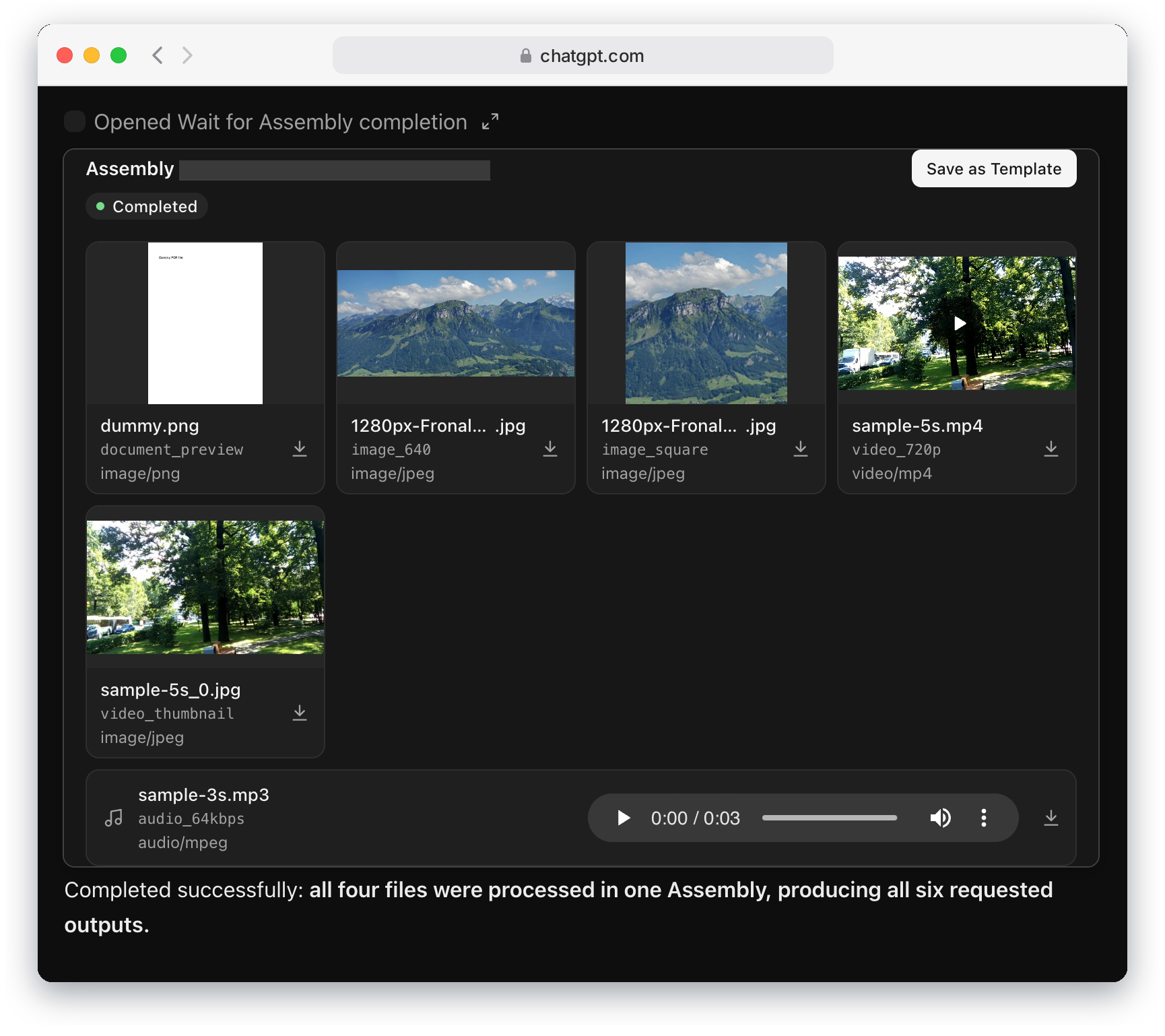
- Status: a readable label such as Completed, Processing, Waiting for uploads or Failed. A failed Assembly also shows its error message and code. While the Assembly runs, a note says that result files appear when it completes.
- Assembly ID: links to the Assembly in the Console.
- Template shortcut: Save as Template opens a new Template in the Console, seeded with the Assembly’s instructions. The card does not offer it for failed Assemblies, Assemblies that are still waiting for uploads, or Assemblies whose status could not be read.
- Results: when several Steps each produced one or two files, all results share one grid and each card names the Step that made it. Otherwise each Step gets its own section with its Robot and file count. A card shows the file name, its dimensions and size (or its MIME type), a preview, and a download button. Image and video previews keep their size while they load, and videos play inline.
- Audio: each audio file is a full-width row with a player.
- Uploads: the files you uploaded fold into an Uploaded files row at the bottom.
- Long results: a Step shows up to 8 files and the card up to 12; the rest fold behind Show N more. The card caps its height at what the client allows, or 720 pixels, and scrolls, with a fade that says how many files are below.
- Theme: the card follows the client’s light or dark theme.
CI and headless clients
Where nobody can approve access in a browser, such as in CI jobs, servers or agent runtimes, mint a
Bearer token from an Auth Key and send it as Authorization: Bearer <token>:
npx -y @transloadit/node auth token --aud mcp
Generate this token in a trusted environment (backend, CI, or local shell), then hand it to the agent runtime. You can mint it via:
- CLI:
npx -y @transloadit/node auth token --aud mcp - API:
POST /token - Node.js SDK: instantiate
TransloaditwithauthKey+authSecret, then callclient.mintBearerToken({ aud: 'mcp' })
Using the token
Pass the token as Authorization: Bearer <access_token> on API requests. When a request is
authenticated with a valid Bearer token, API2 treats
Signature Authentication as satisfied and
skips signature validation. Signature Authentication is enforced only for key/secret requests.
Scope checks still apply. The default api2 audience is accepted by regular API2 endpoints and is
valid for 21,600 seconds by default. The mcp audience is accepted by the MCP server, which relays it
to API2 with a service credential; it is rejected by regular API2 endpoints when presented directly, and valid for
604,800 seconds by default. Treat the response’s expires_in value as authoritative.
Keep bearer tokens out of version control and shared configuration. Use your client’s secret storage or environment-variable support instead of committing a real token.
Claude Code with a Bearer token
Use this remote-server entry in Claude Code’s project .mcp.json. Its HTTP transport value is
http. Set TRANSLOADIT_API2_BEARER_TOKEN to your minted API2 token in the environment that launches
Claude Code; the configuration below expands that variable at runtime. See the
Claude Code MCP documentation.
{
  "mcpServers": {
    "transloadit": {
      "type": "http",
      "url": "https://api2.transloadit.com/mcp",
      "headers": {
        "Authorization": "Bearer ${TRANSLOADIT_API2_BEARER_TOKEN}"
      }
    }
  }
}
Other clients that let you set request headers for a remote MCP server take the same
Authorization header.
Self-hosted
Run the server where your agent runs and set TRANSLOADIT_KEY and TRANSLOADIT_SECRET; the server
then handles authentication for API calls automatically.
Stdio
TRANSLOADIT_KEY=MY_AUTH_KEY TRANSLOADIT_SECRET=MY_SECRET_KEY npx -y @transloadit/mcp-server stdio
Most clients start the server for you. For example, in Claude Code:
claude mcp add --transport stdio transloadit \
  --env TRANSLOADIT_KEY=MY_AUTH_KEY \
  --env TRANSLOADIT_SECRET=MY_SECRET_KEY \
  -- npx -y @transloadit/mcp-server stdio
Or in Codex:
codex mcp add transloadit \
  --env TRANSLOADIT_KEY=MY_AUTH_KEY \
  --env TRANSLOADIT_SECRET=MY_SECRET_KEY \
  -- npx -y @transloadit/mcp-server stdio
HTTP
TRANSLOADIT_KEY=MY_AUTH_KEY TRANSLOADIT_SECRET=MY_SECRET_KEY \
npx -y @transloadit/mcp-server http --host 127.0.0.1 --port 5723
http mode defaults to path /mcp.
If you bind HTTP mode to a non-localhost host, set TRANSLOADIT_MCP_TOKEN to require Bearer auth
for MCP requests.
Docker
docker run -i --rm \
  -e TRANSLOADIT_KEY=MY_AUTH_KEY \
  -e TRANSLOADIT_SECRET=MY_SECRET_KEY \
  ghcr.io/transloadit/mcp-server:latest
The image starts stdio mode. For HTTP mode, override the entrypoint and expose the port. Binding
to 0.0.0.0 requires a TRANSLOADIT_MCP_TOKEN, which clients
then send as Authorization: Bearer <TRANSLOADIT_MCP_TOKEN>:
export TRANSLOADIT_MCP_TOKEN="$(openssl rand -hex 32)"
docker run --rm \
  -e TRANSLOADIT_KEY=MY_AUTH_KEY \
  -e TRANSLOADIT_SECRET=MY_SECRET_KEY \
  -e TRANSLOADIT_MCP_TOKEN \
  -p 5723:5723 \
  --entrypoint transloadit-mcp \
  ghcr.io/transloadit/mcp-server:latest \
  http --host 0.0.0.0 --port 5723
Signature algorithm
Set TRANSLOADIT_SIGNATURE_ALGORITHM to the algorithm your Auth Key is configured for; the
Console’s snippet for the key shows it. Keys created in the Console with
Allow signing Smart CDN URLs turned on (the default) use
sha256, and the server defaults to sha384. A mismatch fails with mcp_invalid_signature, and
its hint names the algorithm the key requires.
TRANSLOADIT_MCP_TOKEN explained
TRANSLOADIT_MCP_TOKEN is a self-hosted MCP transport token. It protects your own HTTP MCP endpoint
(npx -y @transloadit/mcp-server http), not API2.
- Set it yourself to any high-entropy secret.
- Send it from your MCP client as
Authorization: Bearer <TRANSLOADIT_MCP_TOKEN>. - It is not minted via
/token. - It is separate from API2 Bearer tokens used for
https://api2.transloadit.com/mcp.
Generate one, then start HTTP mode:
export TRANSLOADIT_MCP_TOKEN="$(openssl rand -hex 32)"
npx -y @transloadit/mcp-server http --host 0.0.0.0 --port 5723
Result widget settings
The result widget may load previews from https://*.transloadit.com, https://*.transloadit.net
and https://*.r2.dev. Override that list with TRANSLOADIT_MCP_RESULT_DOMAINS (comma-separated
origins). Its Console links point to https://transloadit.com; change that with
TRANSLOADIT_MCP_CONSOLE_URL.
Limits
These limits apply to inline JSON and base64 payloads:
- Hosted request body limit: 1 MiB
maxBase64Bytes: 512,000 decoded bytes, hosted and self-hosted- Self-hosted default request body limit: 10 MiB (configurable with
maxRequestBodyBytes)
URL inputs that the server downloads (for Templates that expect uploads) are capped at 1 GiB in
total per call and 10 minutes per download. For larger files, use a public URL with an
/http/import Step, upload from the agent’s sandbox, or upload from
your own machine with npx -y @transloadit/node upload.
URL and template behavior
For URL inputs, the server chooses a safe path based on the target instructions/template:
- If an
/http/importStep exists, it sets/overrides that Step'surl. - If the template expects uploads (
:originalor/upload/handle), it downloads the file and then uploads it via tus. These downloads require public HTTP(S) URLs; private-network targets are rejected, including redirects to private addresses. - If the template does not take file inputs, URL inputs are ignored with a warning.
- If a template forbids Step overrides and only supports
/http/import, URL inputs are rejected.
Metrics and server card
HTTP deployments include:
- Prometheus metrics at
GET /metrics(default) - Optional metrics auth via
TRANSLOADIT_MCP_METRICS_USERandTRANSLOADIT_MCP_METRICS_PASSWORD - Public MCP server card at
/.well-known/mcp/server-card.json, listing every tool with its annotations and security schemes
You can customize metricsPath, disable metrics (metricsPath: false), and configure
CORS/host restrictions in the HTTP/Express server options.
Using MCP with /ai/chat
/ai/chat can call any MCP server reachable from your environment.
For Transloadit-hosted MCP servers, you can use:
{
  "mcp_servers": [
    {
      "type": "http",
      "url": "https://api2.transloadit.com/mcp",
      "auth": "transloadit"
    }
  ]
}
With auth: "transloadit", API2 can auto-mint and inject a scoped short-lived Bearer token for
eligible Transloadit-hosted MCP URLs. If you already provide Authorization in
mcp_servers[].headers, API2 leaves it untouched.