Transloadit
Pricing
  • File Uploads
  • File Importing
  • Video Encoding
  • Audio Encoding
  • Image Processing
  • Document Processing
  • Artificial Intelligence
  • File Filtering & Security
  • Media Cataloging
  • File Compression
  • Code Evaluation
  • File Exporting
  • Smart CDN
  • View all services
  • Explore integrations
  • Explore live demos
  • Uppy
  • TransloaditKit
  • Android SDK
  • Node SDK
  • Python SDK
  • Ruby SDK
  • Go SDK
  • Java SDK
  • PHP SDK
  • Zapier
  • MCP Server
  • Terraform
  • Essentials
  • Best Practices
  • FAQ
  • Robots
  • API
  • Formats
  • Build your first app
  • About
  • Comparisons
  • Open Source
  • Testimonials
  • Jobs
  • Security
  • Posts
  • DevTimes
  • DevTips
  • Press
  • Research
  • Case Studies
  • Solutions
  • Guides
  • Glossary
  • Legal
  • Tools
  • Helping Coursera bring education to millions around the world
  • Transloadit Support
  • Open Source Support
  • Service level agreement
EssentialsRobotsFAQAPIFormatsBest Practices

What is Turbo mode?

In the current plan lineup, video Turbo mode is included with Pro and Enterprise, but not with Community or Lite. Existing legacy plans retain their agreed features.

Turbo mode is available for 🤖/video/encode and 🤖/video/concat, which allows you to make encoding up to 22x faster by splitting a video into several small chunks that can be encoded in parallel and then stitched back together into the finished product.

Due to the complexity of Turbo mode, this results in increased usage of Priority Job Slots as the number of chunks increases. So users with fewer Priority Job Slots can use this feature, we allow tuning of how many chunks are created. By default, if you upload a video file over a minute long, the video will be split into 10-second chunks, and if it's under one minute, it will be split into 5-second chunks.

To configure how many chunks are generated, we've created the chunk_duration parameter. The higher value you set, the fewer chunks will have to be created. This requires fewer Priority Job Slots to transcode as part of the priority queue.

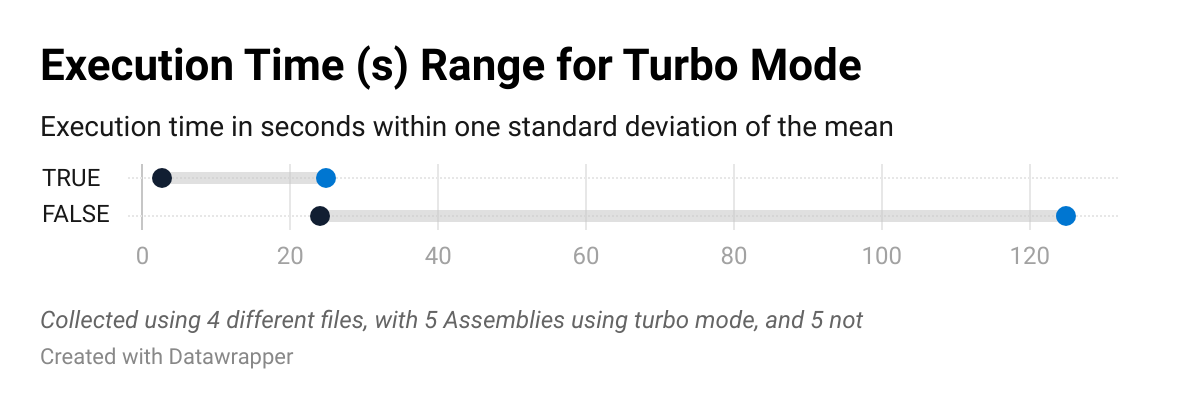
Below, we have linked statistics showcasing the encoding times of Assemblies run with and without turbo-mode, on files of varying durations.
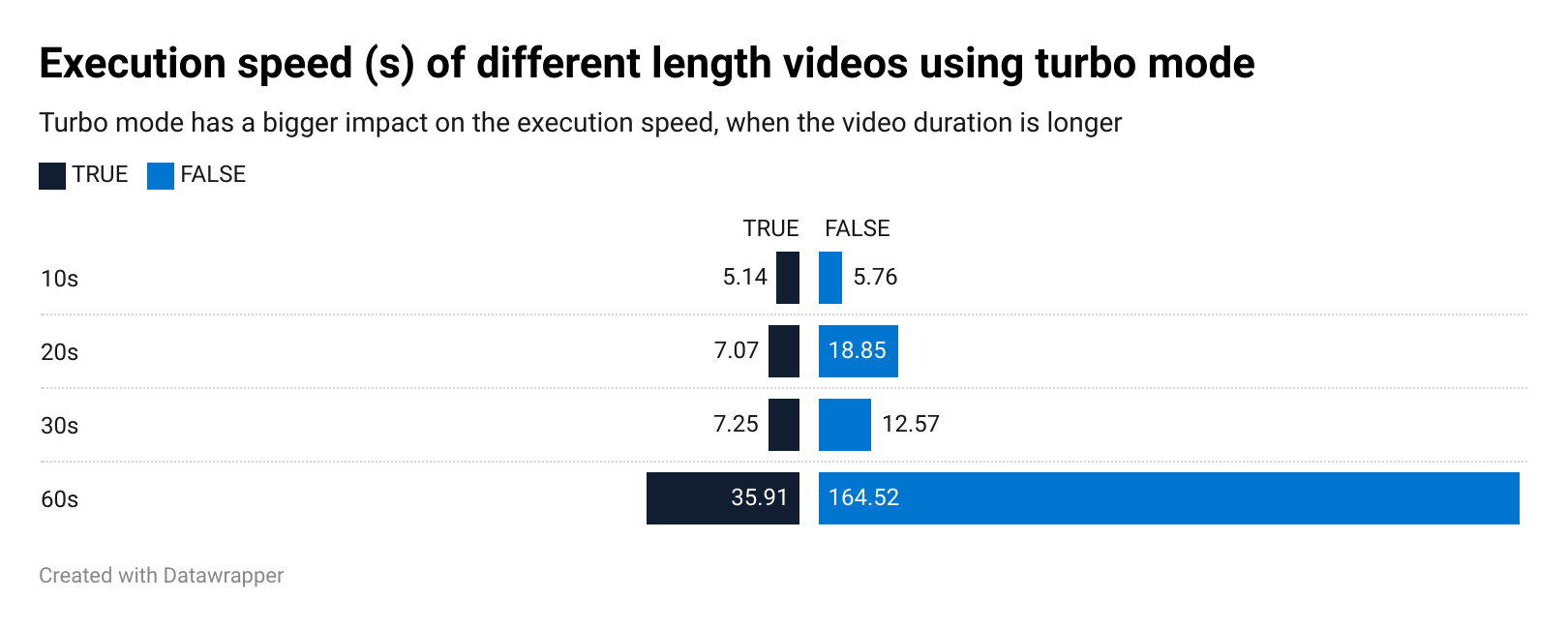
Bar chart showing the execution speed time gain from Turbo Mode, being more noticeable on videos with a longer duration.

Line-graph showing the range of execution speed values, within one standard deviation either side of the mean. When Turbo Mode is enabled, the execution speed is noticeably faster.

See also:

What formats and codecs does Transloadit support?
Which payment plan do you recommend?
What if videos enter an image workflow?
TransloaditChecking status…

Product

  • Services
  • Pricing
  • Demos
  • Tools
  • Security
  • Support

Company

  • About/Press
  • Blog/Jobs
  • Comparisons/Compliance matrix
  • Research
  • Open source
  • Solutions

Docs

  • Getting started
  • Transcoding
  • FAQ
  • API
  • Guides/DevTips
  • Supported formats

More

  • Platform status⁠
  • Community forum⁠
  • StackOverflow⁠
  • Uppy
  • tus⁠

© 2009–2026 Transloadit-II GmbH

PrivacyTermsImprint