Transloadit
Pricing
  • File Uploads
  • File Importing
  • Video Encoding
  • Audio Encoding
  • Image Processing
  • Document Processing
  • Artificial Intelligence
  • File Filtering & Security
  • Media Cataloging
  • File Compression
  • Code Evaluation
  • File Exporting
  • Smart CDN
  • View all services
  • Explore integrations
  • Explore live demos
  • Uppy
  • TransloaditKit
  • Android SDK
  • Node SDK
  • Python SDK
  • Ruby SDK
  • Go SDK
  • Java SDK
  • PHP SDK
  • Zapier
  • MCP Server
  • Terraform
  • Essentials
  • Best Practices
  • FAQ
  • Robots
  • API
  • Formats
  • Build your first app
  • About
  • Comparisons
  • Open Source
  • Testimonials
  • Jobs
  • Security
  • Posts
  • DevTimes
  • DevTips
  • Press
  • Research
  • Case Studies
  • Solutions
  • Guides
  • Glossary
  • Legal
  • Tools
  • Helping Coursera bring education to millions around the world
  • Transloadit Support
  • Open Source Support
  • Service level agreement
EssentialsRobotsFAQAPIFormatsBest Practices
Getting started
  • Overview
  • My first App
  • Saving result files
Topics
  • Assembly Instructions
  • Assembly Variables
  • Dynamic Evaluation
  • Templates
  • Webhooks
  • Third party Credentials
  • Builtin Templates
  • Resize Strategies
  • Assembly Execution Progress
  • Workspaces
  • AI Agents
  • Advanced use Parameter
  • The ignore_errors Parameter
Software Development Kits
  • Overview
  • Android SDK
  • Browsers
  • Convex
  • cURL
  • Go SDK
  • Java SDK
  • MCP Server
  • Multipart Form
  • Node.js SDK
  • PHP SDK
  • Python SDK
  • Ruby SDK
  • Terraform
  • TransloaditKit
  • Zapier Integration

Resize Strategies

The examples below show how the resize_strategy impacts resizing a 400×300 pixel image to 100×100 pixels:

fit

Uses the larger side of the original image as a base for the resize. Aspect ratio is preserved. Either side will become at most 100 pixels.

For example: resizing a 400×300 image into 100×100, would produce a 100×75 image.
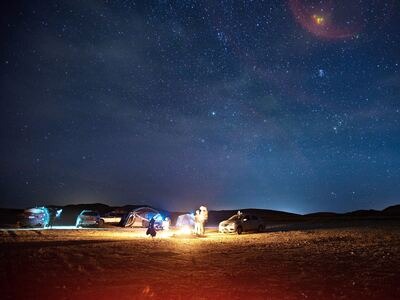
Before:
The fit resize strategy keeps the full image within 100 by 100 pixels
Larger side

desert-small.jpg

21 KB ⋅ 400×300

After:
The fit resize strategy keeps the full image within 100 by 100 pixels
100 px

desert-small.jpg

3.1 KB ⋅ 100×75

fillcrop

Scales the image to fit into our 100×100 target while preserving aspect ratio, while trimming away any excess surface. This means both sides will become exactly 100 pixels, at the tradeoff of destroying parts of the image.

By default the resulting image is horizontally/vertically centered to fill the target rectangle. Use the gravity parameter to change where to crop the image, such as "bottom" or "left".

Before:
The fillcrop resize strategy fills a 100 by 100 pixel square and crops the excess

desert-small.jpg

21 KB ⋅ 400×300

After:
The fillcrop resize strategy fills a 100 by 100 pixel square and crops the excess

desert-small.jpg

3.9 KB ⋅ 100×100

min_fit

Uses the smaller side of the original image as a base for the resize. After resizing, the larger side will have a larger value than specified. Aspect ratio is preserved. Either side will become at least 100 pixels.

For example: resizing a 400×300 image into 100×100, would produce a 133×100 image.
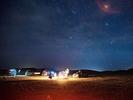
Before:
The min_fit resize strategy keeps both image dimensions at least 100 pixels
Smaller side

desert-small.jpg

21 KB ⋅ 400×300

After:
The min_fit resize strategy keeps both image dimensions at least 100 pixels
100 px

desert-small.jpg

4.6 KB ⋅ 133×100

pad

Scales the image to fit while preserving aspect ratio. Both sides of the resized image become exactly 100 pixels, and any remaining surface is filled with a background color.

In this example, the background color is determined by the Assembly Variable ${file.meta.average_color}. If you set zoom to false (default is true), smaller images will be centered horizontally and vertically, and have the background padding all around them.
Before:
The pad resize strategy adds background color to create a 100 by 100 pixel image

desert-small.jpg

21 KB ⋅ 400×300

After:
The pad resize strategy adds background color to create a 100 by 100 pixel image

desert-small.jpg

3.4 KB ⋅ 100×100

stretch

Ignores aspect ratio, resizing the image to the exact width and height specified. This may result in a stretched or distorted image.
Before:
The stretch resize strategy distorts the image to exactly 100 by 100 pixels

desert-small.jpg

21 KB ⋅ 400×300

After:
The stretch resize strategy distorts the image to exactly 100 by 100 pixels

desert-small.jpg

3.8 KB ⋅ 100×100

crop

Cuts an area out of an image, discarding any overlapping parts. If the source image is smaller than the crop frame, it will be zoomed. This strategy is implied when you specify coordinates in the crop parameter, and cannot be used without it.

To crop around human faces, see 🤖/image/facedetect instead.

Before:
The crop resize strategy cuts a 100 by 100 pixel area from the image

desert-small.jpg

21 KB ⋅ 400×300

After:
The crop resize strategy cuts a 100 by 100 pixel area from the image

desert-small.jpg

2.8 KB ⋅ 100×100

Previous page ← Builtin TemplatesNext page Assembly Execution Progress →
TransloaditChecking status…

Product

  • Services
  • Pricing
  • Demos
  • Tools
  • Security
  • Support

Company

  • About/Press
  • Blog/Jobs
  • Comparisons/Compliance matrix
  • Research
  • Open source
  • Solutions

Docs

  • Getting started
  • Transcoding
  • FAQ
  • API
  • Guides/DevTips
  • Supported formats

More

  • Platform status⁠
  • Community forum⁠
  • StackOverflow⁠
  • Uppy
  • tus⁠

© 2009–2026 Transloadit-II GmbH

PrivacyTermsImprint